Common questions (FAQ)
When we receive many questions about specific features – whether it’s workflows, calendar, scheduling, time blocking, or others – we provide answers directly on their documentation pages.
Feel free to also use the search above – or if on mobile, access all documentation pages through the top-left hamburger menu icon ☝️
Didn’t find your answer there? This FAQ answers other common questions and reports we receive 👇
Bugs and common issues
- Login email with a one-time sign-in code isn’t arriving
Please check your spam folder first. If the email is still nowhere to be found, please wait ten minutes, or more (in rare cases).
It can happen from time to time that there’s a slight temporary delay in delivering emails to your email provider – it’s rare but normal. Our systems will keep trying until the email is successfully delivered.
If there’s still no email after some time, you can send us a message and we’ll check what went wrong with the email – no problem at all!
- The app asked me to login again and now my data is gone!
Since login is done via a one-time sign-in code sent to your mailbox, there are no separate signup and login flows, and accounts are provisioned on the fly when you log in for the first time.
Because of that, people who have multiple email addresses sometimes accidentally create a new account when they use the wrong address. Perhaps your account and data safely lives under your Yahoo address instead of your Gmail one?
Please double-check your email address. You can do that, for example, by searching your mailbox for past login emails from Lunatask — if you don’t find any, you know it’s the wrong mailbox.
- Notifications don’t work in the mobile app
Make sure you have notifications enabled in Settings → Notifications for both tasks placed on your calendar and scheduled habits. Notifications aren’t enabled by default.
Note for users on alternative Android distributions:
Our recently released Android app uses Google Play Services for notification delivery – to receive notifications on alternative Android distributions, Google Play Services must be enabled.
Since we’re a small team of two, and given our current resource and time constraints, we don’t plan to introduce an alternative notification delivery system at this time – we appreciate your understanding!
- I can’t log in with my password on GrapheneOS or in Lockdown Mode on iOS
Lunatask uses argon2 key derivation function for password hashing as part of our encryption toolchain, implemented in WebAssembly.
To set up the mobile app, please temporarily disable Lockdown Mode. After you’ve logged in and configured a four-digit PIN in the settings (optional, if you need that feature), you can re-enable Lockdown Mode again.
On GrapheneOS, enable WebView JIT for the app.
- I see black rectangles instead of text in alerts and confirmation messages on Linux
This issue may happen on some systems for those using the snap version of our app. Make sure hardware acceleration is disabled in Settings → Diagnostics, and try clearing font caches using the following commands:
fc-cache -r
rm ~/.cache/fontconfig/*
sudo rm -f /var/cache/fontconfig/*
If that doesn’t help – or the issue comes back after app/system restart and you can’t figure out a workaround – please download and use the AppImage version of our app instead.
- Elements have poor contrast with black text on dark background in dark mode on Android
We’re aware of these dark mode issues with some components and elements on Android – it’s a temporary issue that will be fixed soon. Please see more context and updates under this feature on our Idea Portal 👈
We appreciate your understanding and apologize for the inconvenience in the meantime!
Help with features, roadmap, etc.
Please check our Idea Portal before asking whether a certain feature is coming to Lunatask – if you find it there, add a vote for it instead. Our Public Roadmap is also posted there, and many features listed share additional context, status updates, or alternative solutions and workarounds 🌟
- Can I create reminders for tasks?
Absolutely! Lunatask offers several ways to set up reminders, helping you stay on top of future tasks and bring them to your attention when the time comes, so nothing slips through the cracks.
See our guide on working with future tasks and setting up reminders if you’d like to be reminded of a future task on a specific date – learning and understanding this first is essential 👈
If you’re planning your day hour by hour or just want to be reminded of a task at a specific time via desktop or mobile notifications, simply plan the task into your day.
- Can I add images to my notes or journal entries?
Yes, you can – but please see both our article on embedding images and this card on our Idea Portal for more context.
- What are the numbers next to tasks?
They show how many days a task has been around. While it might seem a bit odd at first, they serve an important psychological role – you’ll notice and it becomes clear over time, as it’s an essential part of our guiding system and approach.
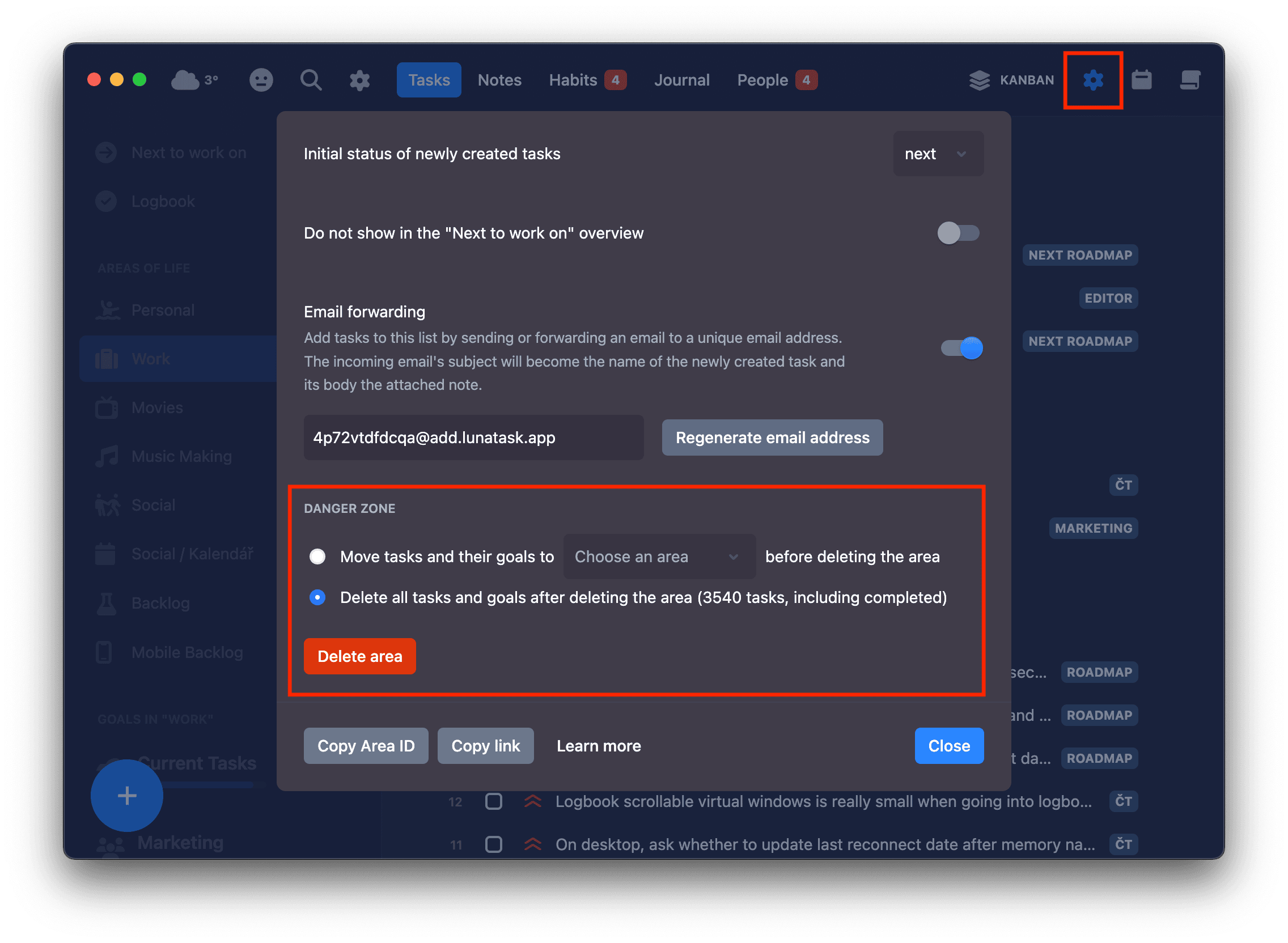
- How can I delete an area of life?
To delete an area, open its settings and scroll down below the option to pick an icon and various other settings:
- Why some tasks have a notch in their checkbox? What’s your design philosophy?
In the past, many users asked for an indicator showing that a task has a note (task description) attached. We were hesitant to add another icon next to task names, as it could clutter the UI – and in many cases, wouldn’t be necessary.
Ultimately, we came up with a solution that provides an indicator for those who need it without cluttering the UI for those who don’t – hence the subtle notch in the checkbox marking tasks with an attached note.
We often hear from users who appreciate the clean, minimalist design of our desktop app. Our philosophy is simple – the best button is no button. That said, it comes with some tradeoffs, as some features may be harder to discover.
Examples of this may be the collapsing of sections in your task lists and relationship tracker, or our “tomorrow“ calendar. While most apps display an arrow icon to collapse or hide a section, we intentionally don’t – you simply click its name to do so. There are many more “hidden“ features, shortcuts, and tricks like that.
For the same reason, we’re currently resistant to adding an indicator for recurring tasks, as it’s rarely needed and would add unnecessary clutter for most users.
In this case, if you have a recurring task scheduled for this Friday, an indicator showing you will have to do the same task again a week later doesn’t add much value. Focus on what’s needed “now”. When you complete the task on Friday, a new task for next Friday will be added to your list – no extra indicators needed.
We understand this approach may make some features less obvious, but we do our best to continuously improve our documentation and onboarding to help – we appreciate your understanding!
- Is there a way to schedule subtasks?
Not currently – but please see the note touching on that in our article on subtasks.
- Can I delegate or share tasks or notes with my partner, family, etc?
Lunatask is an end-to-end encrypted app, making sharing data difficult.
This is a common limitation of encrypted apps – encryption and sharing don’t usually work well together. That said, we might make changes to our encryption model allowing task list sharing in the future.
Workaround for some use cases: It’s currently possible to add tasks to, for example, your children’s lists without being able to access anything in their account – check our email integration, Shortcuts on iOS and Mac, or any of our other integrations.
- Is there a view of all tasks between all areas and goals, not just current ones?
Unfortunately, there isn’t at the moment – Lunatask embraces the philosophy of “less is more”.
Although we understand you may want to use this occasionally, we generally don’t want to have many different views on tasks in the app – hence why we offer only the “Next to work on” overview of all current tasks across all areas.
- I don’t use the journal or relationship tracking. Can I turn them off?
Users ask from time to time for the ability to customize Lunatask to have only certain features they use or need.
This feature isn’t necessarily challenging from a technical standpoint, but it might have profound implications on what our product is, our business, marketing, who the target persona is for Lunatask, how the app should be priced, etc. It’s a bit of a rabbit hole for us when discussing it and it’s our current product decision not to offer this feature at the moment.
Think of it this way: The solution isn’t to disable or hide the journal or habit tracker – the solution is to make them even better, so you can’t resist but to use them :)
- Why sections hide when there are no tasks in them? I can’t drag and drop tasks easily.
Because they would unnecessarily clutter your task list and be distracting – imagine it 👇
While we offer a workflow with just two sections, others might have 4 or 7 – some future workflows might even have 10 sections. In addition, our Kanban workflow is one of the two most commonly used and offers a “Waiting“ section – often rarely or never used by many.
Tip: Try Shift+Left and Shift+Right keyboard shortcuts instead – once you learn these, you won’t want to go back 🌟
- Why keyboard shortcuts for changing status ignore
Waiting status?
Waiting status?Those shortcuts skip Waiting status as it’s not part of usual flow.
Tasks usually start in Later, then you move them into Next, eventually start working on them and moving them into In progress, and lastly, you mark them as complete. So, Waiting status is a special flag that one rarely uses in practice.
Having the app move a task from Later to Waiting as its default behavior wouldn’t make sense and likely be frustrating.
- Would it be possible to use different workflow in one or several of my goals?
Hey there, Mike here! I totally understand the use case and why you’re asking.
I’m actually in the same situation. If I simplify things a bit, I have two goals (folders) in my “Work” area – one where my current tasks live (what I’m working on right now or will be working on soon) and then “Roadmap”, where everything else lives (hundreds of tasks meticulously prioritized using Must/Should/Want and task priorities).
When I want to check the roadmap, I need to switch to that folder (goal) and also switch the workflow to Must/Should/Want to actually see the roadmap and how it’s prioritized, so I understand the issue or, in some sense, inconvenience.
However, there’s a logical problem if goals within one area could use different workflows: What should the main list of tasks for the area show, and how? 💡
There’s a benefit in being able to switch between workflows freely, and nothing being lost in the process, but here comes the problem with workflows being separate, tracking tasks separately, and not affecting other workflows:
To give an example, if you use Must/Should/Want in one goal and move a task from “later” to “must” – what should the main list of tasks for the area show if that’s set to Kanban workflow or Eisenhower Matrix? Do you see that logical issue now? And with even more workflows coming in the future, this problem would become even bigger.
If the purpose of the main list of tasks for the area is to show all your current tasks, regardless of their goal, it wouldn’t work if each goal uses a different workflow/prioritization method – I don’t think it’s technically or logically possible to solve. It itself would then have to separate tasks based on their goal and show them separately, which would break cross-goal prioritization, and so on – not to mention the mess “Next to work” overview would be.
- Are there any plans for integrating tasks and notes more?
We’re constantly thinking about how to approach this going forward when priorities allow.
Linking and Deep Linking are now available. We’re also planning a feature that will let you paste text and automatically create a task for each line. For example, you could copy an entire checklist from a note, switch to your task list, and paste it to instantly turn each item into its own task.
Another feature on our radar is the ability to embed fully interactive tasks directly within any Markdown document – the same task component you see and interact with in your task list, complete with double-click to open and full task details inside.
This would let you create richly detailed, multi-page project plans in your notes (or goal descriptions), with tasks and task lists seamlessly woven throughout the document.
Any changes you make to a task in one place would automatically be reflected everywhere else, since it’s the same task – just accessed from different parts of Lunatask.
There may be other solutions too – we shall see what the future brings!
Help with billing, subscriptions, plans, discounts, etc.
You can redeem a discount code here, request education discount here – and for any questions related to billing, subscriptions, or discounts, please see our dedicated FAQ 👈
Other app-related questions
- Are there any step-by-step video tutorials or webinars on how to use the app?
Unfortunately, there are no official ones yet at the moment. Lunatask is a young app, built by a solo indie developer (hi!), so there’s a lot on my plate – not just building and improving apps themselves, maintaining our server infrastructure, but also this website, documentation, providing user support, etc.
Documentation is much easier to update and keep up to date, so I recommend you start there. If you still have any questions or if something isn’t clear, don’t hesitate to reach out or join our Slack Community – we have amazing, insightful conversations there where many others can chime in with their ideas, insights, tips or tricks – it happens all the time.
I appreciate your understanding!
- Is Lunatask available in Portuguese, German, or other language? Can I help with translating?
Our apps and documentation are available only in English. Lunatask is a young project, and everything we do is optimized for the speed of development. There’s still so much left to be built – see our Idea Portal.
Maintaining localizations and translating each new feature or copy change into all languages would slow our development cycle considerably. For these reasons, we don’t provide localizations for our apps, nor is it on our roadmap for the next 12 months.
- I don’t like the curvy font. Can I change it?
We know it has been a controversial choice – we picked it to make the app’s interface more friendly and welcoming.
It has been a temporary solution until we find a better alternative or introduce the option to choose from multiple font combinations for note titles and content – for example, some users may prefer writing in serif fonts for improved readability.
But we have good news – we might have already chosen a new font to roll out across the app as part of an upcoming overall design refresh. We can’t share more just yet, but stay tuned!
- How can I delete my account?
To delete your Lunatask account and all its data, please visit lunatask.app/account-delete
- Is the app’s icon supposed to represent a pride flag?
No, it’s a pure coincidence – the background represents the colorful grid of our habit tracker.
We didn’t realize until one of our users pointed out the similarity. We support the LGBTQ+ cause anyway, so we don’t mind the resemblance, but it wasn’t an intention and there’s certainly no relation.
Other non app-related questions
- Why do you have a community on Slack and not Reddit or Discord?
Our Slack Community is where users are much closer to our development, while also providing valuable early feedback, shaping future development direction, and more.
Certain tools attract certain kinds of people. Reddit would naturally have a different vibe and bring a different type of community than Slack – the same applies to other tools and apps, like Discord.
By its nature as a central communication hub in many tech companies, Slack attracts more tech-savvy users (developers, designers, testers, etc), as they’re already likely familiar with it and often use it daily in their workspaces.
- I’m a developer/designer/copywriter/etc, and I’d love to help
Mike and Luisa sincerely appreciate your offer, but we currently have all we need – no external help needed. Although thanks anyway! ❤️
Didn’t find your answer? Feel free to send us a message – we’re always here to help! Our Slack Community is also great for asking questions or sharing your feedback 👫