Tasks
This guide covers Lunatask’s amazing, unique approach to task management, including flexible workflows, priority-based lists, and productivity techniques designed for real people who want to get stuff actually done this time.
Your to-do list isn’t broken – you’re just using it like a calendar
At Lunatask, we believe in a more forgiving, human, and actually manageable way to prioritize work and life goals. Our “Now / Later” method is designed to keep your list always focused and achievable.
Instead of treating your task list as a calendar, Lunatask gives you a smart, evolving list of what matters now, without the stress of arbitrary due dates. Tasks naturally surface when they become relevant, so it’s like having priority on autopilot.
Here’s why Lunatask’s productivity method works
You decide what matters “now”, everything else lives in “later”. Lunatask makes sure you always know what to do next, so you can truly focus just on your current focus, instead of having one overwhelming long list of everything.
That’s what sets Lunatask apart from tools like Todoist or Sunsama. Tasks that aren’t relevant now stay out of view, but they don’t disappear. As time goes by, they gain relevance and rise to your attention, without creating plans that fall apart quickly.
So, what is “Now” in Lunatask?
“Now” is your current focus, not tied to a date or deadline — just the tasks that feel important or actionable right now. You give meaning to “Now” — whatever it may mean to you at any given moment.
Everything else waits quietly for its turn in “Later”, automatically sorted by how long it’s been waiting, and other details you’ve added to guide you and help you choose. When you’re ready to move on, the next thing is likely already at the top.
You can always tell Lunatask what’s important to you by adjusting a task’s priority to shape how Lunatask sorts your list and decide what comes first and what can wait, because letting your passport expire is a bigger deal than forgetting to deep clean your washing machine.
Ask yourself – are all those tasks in your overflowing “Today” view in Things 3 truly “today”? Or aren’t they just “next” in reality?
Will this work for me?
If Now/Later doesn’t quite fit how you like to work, that’s okay. It’s just one of many workflows Lunatask offers to organize your tasks.
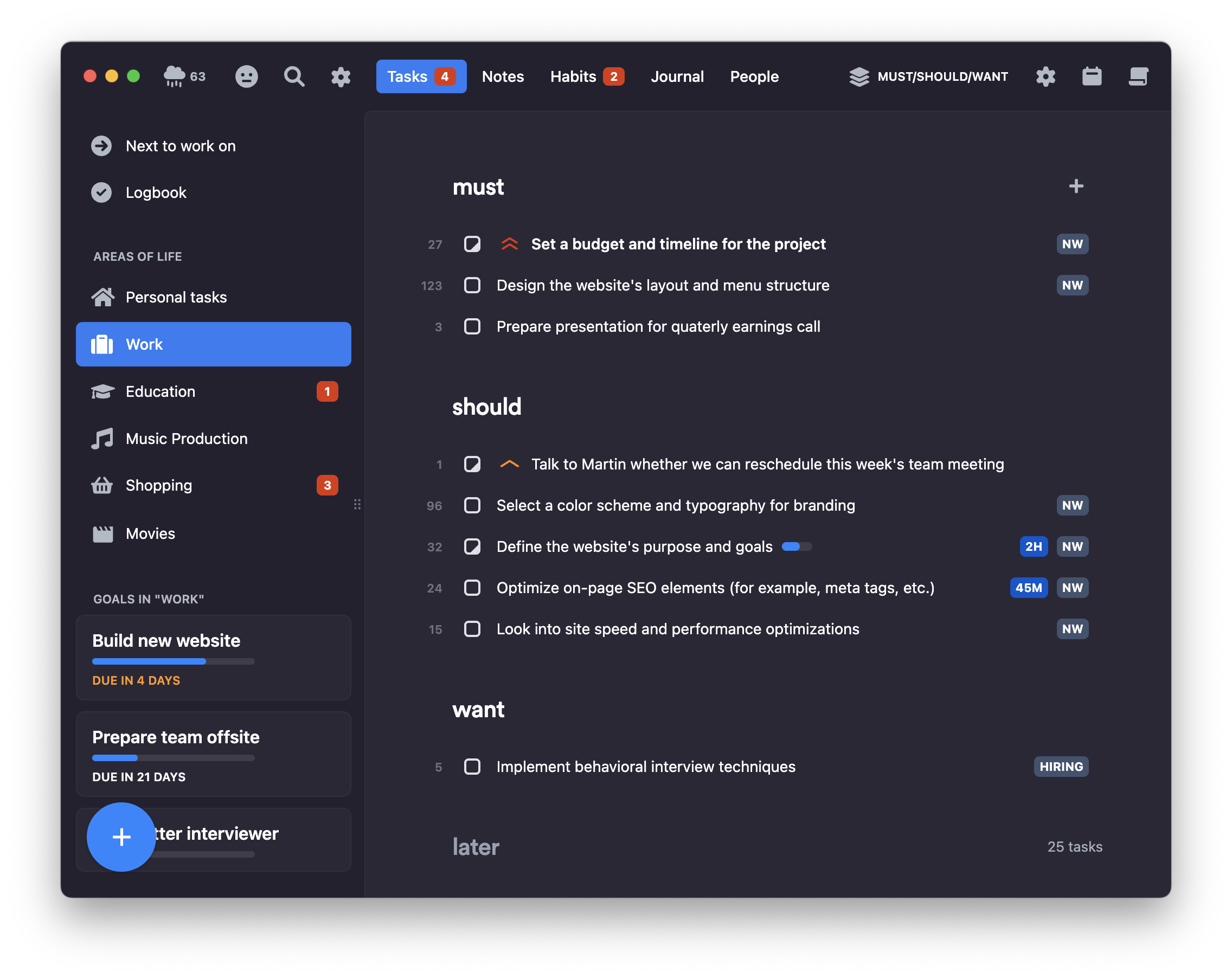
Find Now/Later too limiting, not giving you enough structure? Try our Kanban workflow. Prefer a single, simple backlog? Use our Priority List. Still want to work with dates? Try Plan Your Days. Unsure what’s most important? Give a shot to either Must/Should/Want or Eisenhower Matrix.
The beauty of Lunatask is being able to switch between workflows freely without anything getting lost – unlike in other apps where after changing the structure of our task list you can’t easily get back to the original state.
With that, you can even you can mix and match workflows. You can plan using one workflow and execute in another. One might figure out what’s important using Eisenhower matrix, assign a date to each task, and then switch to Plan Your Days for the rest of the week to work on their tasks.
No matter which workflow you choose, Lunatask’s automatic prioritization of your future options – based on age, status, priority, and other properties – always works behind the scenes to keep your list tidy, manageable, and organized.
You can always raise a task’s priority to move it higher in the list and inform Lunatask of what’s important to you – in the task detail, right-click menu, or via Shift+Arrow Up keyboard shortcut.
Future tasks, reminders, and scheduling
As you’ve learned here, Lunatask comes with its own unique Kanban-like, guiding, and forgiving approach to organization and prioritization, where dates are rarely needed.
What you learn in this article or in our detailed guide covering all our workflows is only half of the picture. With that in mind, it’s absolutely essential to learn and understand how to work with dates, future tasks, reminders, and scheduling correctly in Lunatask 💡
Understanding the full mental model and how those fit in – when to reach for scheduling and when not – is critical, so feel free to pause here and read that article before we continue 👈
How to set up your Lunatask
In our app, tasks live in lists called areas of life, which in turn can have goals. You start with a single area of life for your personal tasks, but also can create additional ones (like “Work” or “Education”).
You can create any number number of goals within each area. Goals can be projects like “Finish website” or other things you want to achieve in life (like “Learn Japanese” or “Make more music”) – more on them, how to use them or abuse them, later in this article.
We believe that one can only truly focus on one area at a time. When at work, you want to focus on work-related tasks so your home chores and bills to pay stay out of view. Whereas on weekends, you don’t want to be stressed with work that’s not relevant at the moment – areas of life create clear boundaries.
Start with just a few areas, like “Work” and “Personal”, and only add new ones once you’re sure you need them. For example, you might later decide to create a separate area for movies you’d like to watch so they don’t clutter your personal to-dos, but don’t try to overthink it at first.
See our guide on how to choose and structure your areas correctly to avoid potential issues 👈
Tracking goals and projects
Whereas areas separate dimensions of your life, goals are here for tracking and organizing things you want to achieve within that dimension.
Although you can think of goals just as nested lists or folders, they offer a few additional features. For example, goals automatically calculate your progress based on completed and pending tasks.
You can also add a due date to a goal to see how much time you have left to complete it, which is great for projects with a deadline.
Since goals are basically just nested lists, folders, or categories with additional functionality, feel free to be creative with how you use or even abuse them – whatever works for you.
It’s fine to have “goals” acting as folders or tags, such as “Chores”, “Archive”, “Roadmap”, “Backlog”, “Bugs”, or “Movies”. In that case, feel free to hide the progress bar in their settings.
Integrations
There are powerful integrations that let you create tasks across different platforms or bring them into Lunatask from other apps and services. Here are a few examples of what you can do:
- Turn emails and conversations into tasks by forwarding them to Lunatask with our email integration
- Save web pages, articles to read, or videos to watch later using browser extensions
- Quickly capture new tasks by talking to Siri on your iPhone, Apple Watch, or HomePod
- Connect to 5,000+ apps and services using Zapier automation platform
- Build powerful automations using Shortcuts (on iOS and Mac) or Tasker (on Android)
- Use community-built tools such as extensions for Alfred or Raycast, CLIs, MCP servers, and more
- Build your own integration using Lunatask API
As your data in Lunatask encrypted, our integrations can only bring tasks in, but not to sync them out to other apps. This is a common limitation of end-to-end encrypted apps, where privacy comes at the cost of easy data sharing – if you need to take your data elsewhere, use export export.
But wait, there’s much more
We just barely scratched the surface in this article. There are other helpful, guiding, built-in productivity techniques in Lunatask – such as work-in-progress limit or timers to help you get started with the task at hand if starting feels hard.
Feel free to check out our dedicated articles to dive deeper into various other features of our task list too, such as time blocking, link extraction, estimates, quick note, subtasks, and more.
Lastly, remember that Lunatask isn’t just about your tasks and to-dos – start building healthy habits or closer, everlasting relationships with the people you know today.